
Coding and Robotics
Coding is something that most people do not understand, are unfamiliar with, or are scared of. I was all of these things until recently. So many elementary schools do absolutely NOTHING with coding and robotics and now that I am well informed on what these are I find that so sad. Coding is simply telling a computer what you want it to by typing in step by step commands. There are so many unfilled jobs in the united states in the computer science field. Students are not taught coding and robotics in elementary mostly because it is expensive and just pushed to the side. The reason we need to teach this is because of several reasons. First, when working with robotics students get a hands on experience with assembling things. When they work with robotics they are using their math, science,and technology skills. Second, your students will LOVE working with robotics and coding too once they get the hang of it. Third, every single child can learn to code at a very young age and that opens up so many job opportunities for them as a young adult.
There are so many different types of robots that can be purchased for schools. Here are a few of them and how they work.
- Edison-
- This robot is Lego compatible
- easy to use ( great for early robotics)
- It cost 50$ per individual robot but the more you order the more discount you get.
- Here is a video to tell a little bit more about what this robot can do for you in your classroom....
2. mBot-
- This robot cost 80$ per robot without shipping
- A little more difficult to use than the Edison
- For elementary students but definitely a challenge.
- This robot comes unassembled but with all of the parts. The students assemble the robot then download the software into the computer. Once they have done that they begin the process of coding to make the robot move.

3. Ozobot-
- tiny robot that is GREAT for beginning coding.
- This robot cost 60$ but sometimes they run deals where you can get 2 for 90$
- Your students would LOVE this and how easy it is to use
- This robot uses colors and patterns drawn by the student on paper or on digital devices to move around.
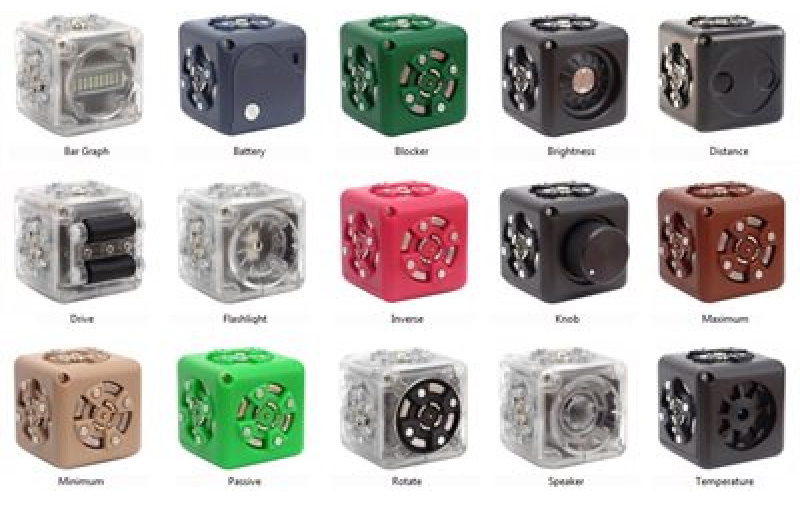
4. Cublets-
- These tiny robots are just as the name descrcribes them. They are cube shaped robots.
- ["Created by Modular Robotics, Cubelets are like your standard building blocks except they aren’t because each block is a robot. Essentially, it’s a simple way to create a functional robot using a combination of different blocks. The kits will come between six and 20 blocks and each block falls into one of three categories: Think, Action, or Sense. Think blocks are the robots programmed to serve as ones giving a directive to the corresponding blocks – they have math or logic functions that enable this; Action blocks, well, perform actions; and Sense blocks are capable of responding to different sights, sounds, or touches. Cubelets are powerful kids educational robots that will enable kids to think logically while they’re building."] -Tech.co.com
- Cost about 160$ for the kit of six cubes
The Osmo is one of my favorite robots that can be used at home or in the classroom. Osmo's are not outrageous priced, about 70$, and they run really great specials for them all the time. You can use this gadget by connecting it to your ipad over the camera. Once it is connected you use the app on the ipad to either draw, play a game, or make patterns. Along with your Osmo you get 26 red and 26 blue letters, and a set of shapes. You use the letters to play the game which is guessing words and you use the pattern blocks to make the shapes. The ipad will show what you need to do on the screen and then you place either letters or shapes in the counter and the Osmo will identify and register what you are putting down. This is something you can use as a station in your classroom for creating words in the younger and older grades. Second, you can use this for math. Students can use the shapes for geometry lessons. Third, you can use the drawing app for science. You can draw a diagram of something and then use apple tv to display and present your master piece. There are so many different ways you can use this app! You will just have to buy it and see for yourself.


Some of the coding apps that I love this most are:
- Kodable app- this is a beginners coding app. It is free. This app doesn't require any knowledge before you start it because the lesson gives step by step directions. Only needs to be done about 20 hours a week to become skilled. Very child friendly. You students/ children would love this.

- Daisy the dinosaur- this app is also great for beginners. Instead of typing in code this is more of a drag and drop type of coding. This would be best for your pre-k through 2nd grades. This app has no cost as well.
- Move the turtle- Great for younger and older elementary students. This app cost 3.99$. A little more challenging than Daisy the Dinosaur. You ca alter this coding app to fit the child using it.
- Scratch junior- This is a website that is free. Here is a little more about it... [programming language that enables young children (ages 5-7) to create their own interactive stories and games. Children snap together graphical programming blocks to make characters move, jump, dance, and sing. Children can modify characters in the paint editor, add their own voices and sounds, even insert photos of themselves -- then use the programming blocks to make their characters come to life.]- scratchjr.com
- Cato's Hike-This is a little bit more expensive than the other apps its 4.99$. I personally believe it is worth it though. This app is for older children, Starting in 3rd grade and reaching all the way up to seniors in high school. This just shows how simple or complex this app can be.


I hope you try some of these fabulous apps! It is in our hands to shape the children for jobs in the future. Coding is definitely a job that needs employees and you do not have to be a genius to have these jobs!

You posted some really awesome options for the robots! Even though they can be pricey, I think that students would love having these robots in the classroom. You did a great job of listing information about each one, and I'm glad you made the video right on the blog to find additional information.
ReplyDelete